
How to make free ringtone for your iPhone on Mac
Good news for iPhone fans! Now any non-protected audio file can be turned into a ringtone for your iPhone on Mac for free. You Macers don't need to pay to have your every ringtone. With the help of Xilisoft iPhone Ringtone Maker for Mac, things become so easy.
Step-by-Step guide to make free ringtone for iPhone on Mac
Maybe you Mac guys have get used to buying ringtones from iTunes, but now, you can also make ringtones for your iphone for free. This tutorial will show you how to convert any unprotected audio file (wav, mp3, etc) into a ringtone on Mac.
Step 1: Download Xilisoft iPhone Ringtone Maker for Mac and install it.
Step 2: Find files.
Find the mp3 or wav file that you want to convert to a ringtone. For example, you can convert a rock drummer loop into a ringtone for your friend who is a monkey percussionist.
Step 3: Add files into the iPhone ringtone maker for Mac
You can add files into the iPhone ringtone maker with the "Browse" button.
Step 4: Pre-listen and set audio segment.
Click "Play" button to pre listen the audio files. You can also drag and drop the start and end slider to get the audio clip you want.
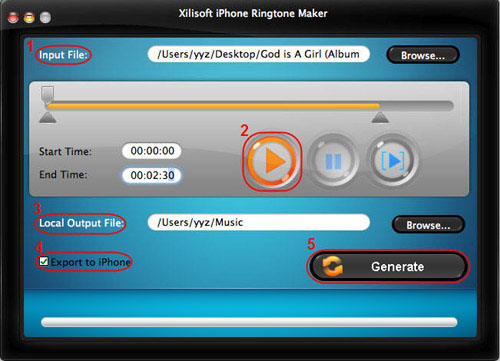
Step 5: Choose a destination folder.
You can click "Browse..." button to choose a destination folder, or prefer to export the ringtone into iPhone directly by checking "Export to iPhone" button.
Step 6: Start to make ringtone for your iPhone on Mac now.
Click "Generate" button to start to create your iPhone ringtone on Mac.
Ok, job done.
If you're interested in this iPhone ringtone creator program, please visit: iPhone Ringtone Maker for Mac.
Support devices:
iPhone, iPhone 3G
Support audio file formats:
MP3, WMA, AAC, WAV, CDA, OGG, FLAC, APE, CUE, M4A, RA, RAM, AC3, MP2, AIFF, AU, MPA, SUN AU
Support video file formats:
AVI, MPEG, WMV, MP4, FLV, MKV, H.264/MPEG-4, DivX, XviD, MOV, RM, RMVB, M4V, VOB, ASF, 3GP, 3G2, SWF, H.261, H.264, DV, DIF, MJPG, MJPEG, DVR-MS, NUT, QT, YUV, DAT, MPV, NSV, AVCHD Video (*.mts, *.m2ts), H.264/MPEG-4 AVC (*.mp4), MPEG2 HD Video (*.mpg; *.mpeg), MPEG-4 TS HD Video (*.ts), MPEG-2 TS HD Video (*.ts), Quick Time HD Video (*.mov), WMV HD Video (*.xwmv), Audio-Video Interleaved HD Video (*.avi)
You may also be interested in...
- How to backup iPad files to iTunes?
- How to convert MKV to iPad with Xilisoft iPad Magic
- How to convert 3GP to iPad with Xilisoft iPad Magic?
- How to convert YouTube to iPhone Ringtone and transfer to iPhone
- How to convert MP3 to M4R iPhone ringtone
- Freely Transfer files from PC to iPhone
- How to manage iPhone without iTunes
- How to transfer iPad to PC?
- More Tips...


