
How to convert MOV to WMV
Wanna play QuickTime MOV files with Windows Media Player? Xilisoft MOV Converter can help you convert MOV files to WMV. It can also convert MOV files to all popular video formats including AVI, MPEG1, MPEG2, WMV, DivX, and convert MOV to audio formats, such as MP3, AAC, WMA and WAV.
Now let's focus on how to convert MOV to WMV with this MOV Converter.
Step 1.Download Xilisoft MOV Converter , and install. Launch it after successfully installed.
Step 2. Click Add button to load .mov files
Click the arrow down, choose All Files (*.*), then you can select .mov files.
Step 3.The "Profile" provides you with optimized output file profile templates for you, and under the "Destination", you can choose the destination folder you want the output files stored.
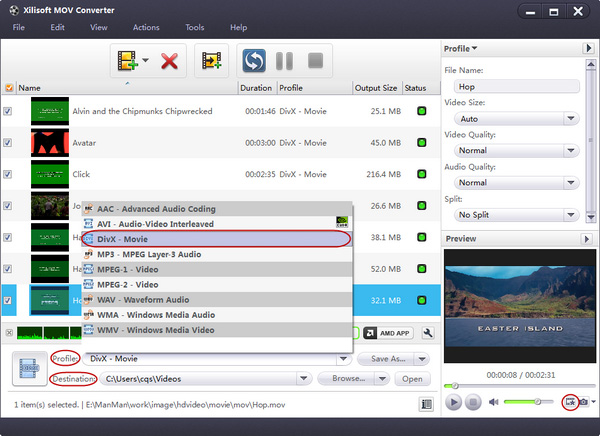
Step 4. Click Convert button to start converting MOV to WMV.
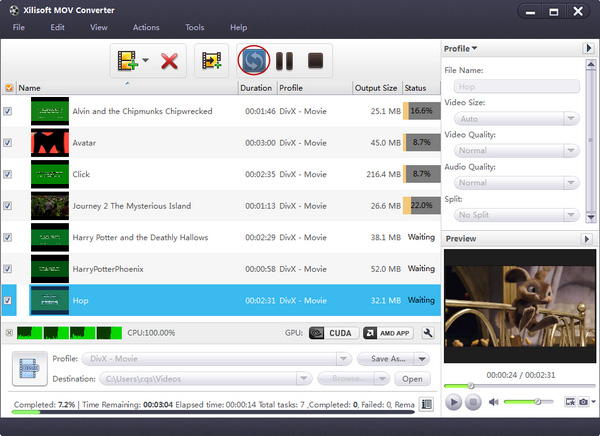
After successful completed MOV to WMV converting, the result will be stored on the destination folder you previously selected.
MOV to WMV key Features:
- Convert MOV to AVI, MOV to MPEG, MOV to WMV, MOV to DivX. Convert between video formats including QuickTime MOV, MPEG4, AVI, MPEG1/2;
- The MOV Converter supports batch conversion;
- Support multithreading, you can convert multiple files at the same time;
- You can use the default settings or set parameters of the video and audio codec by yourself;
- Support preview, users can preview the input files before convetting MOV to WMV;


