
Xilisoft MPEG to DVD Converter for Mac
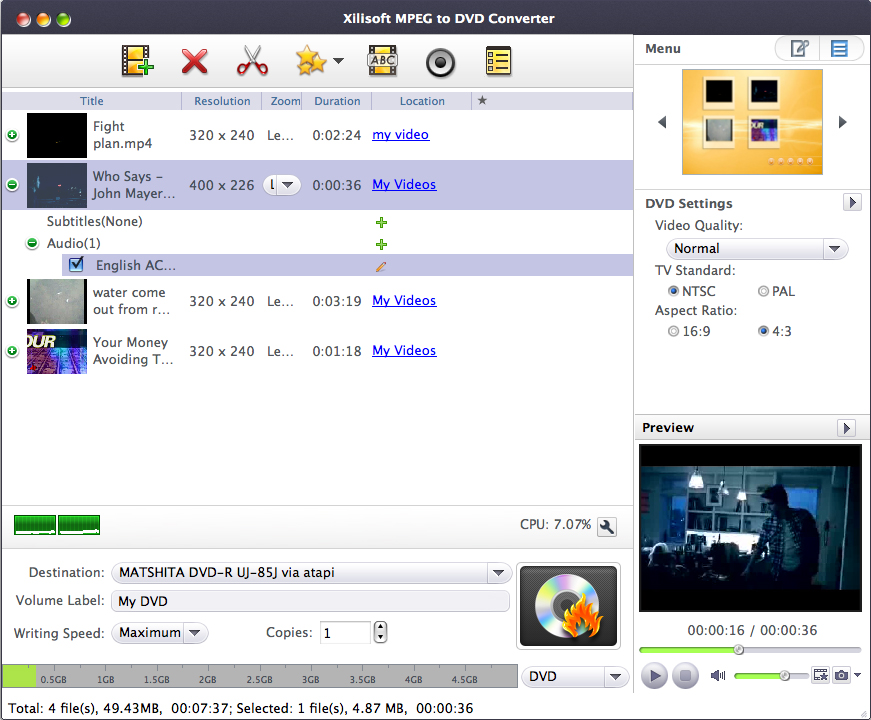
Xilisoft MPEG to Home DVD Converter for Mac enables you to burn MPEG files to DVDs; create Home DVD movie from MP4, VOB, M2V, MPG and DAT video; and convert video files to Home DVD folders or ISO files.
Not just a MPEG to Home DVD converter, Xilisoft MPEG to Home DVD Converter for Mac also provides you with a variety of Home DVD authoring features: create personalized Home DVD menus, clip videos, edit video effects, add multiple soundtracks/subtitles and much more. Try this powerful Mac MPEG to Home DVD converter for yourself FREE.
- Convert MPEG to Home DVD movie on Mac
- Create Home DVD movie from MP4, VOB, M2V, MPG, DAT video
- Burn AVI, MPEG, VOB, DAT, M2V, MPG files to Home DVD folders or ISO files
- Customize Home DVD movie: create Home DVD menu, clip video, crop image, adjust effects, add audio tracks and subtitles, and so on

Customers Also Choose:
Xilisoft DVD to Video Ultimate
Convert DVD to 160+ video/audio formats to play on various mobile phones and tablets. Clip/merge/split video, add subtitle, watermark, effects, etc.
Xilisoft Video Converter Ultimate
Convert common and HD/3D videos in 160+ formats. Merge, clip, split, add video effects, watermark, subtitle, soundtrack, etc to better enjoy it.

Create DVD Movie from MPEG Videos on Mac 
Turn your entire MPEG file collection into DVD movies with exceptional speed and quality
- Convert MPEG Videos to DVD Movie
Convert MPEG, MP4, VOB, M2V, MPG, DAT videos to DVD movie compatible with any DVD player. - Create DVD Folders or ISO Files from Video Files
More than just a DVD movie burner, this MPEG to DVD Mac converter can also create ISO files or DVD folders from MPEG, MP4, VOB, M2V, MPG, DAT files. - Burn Files to Different DVD Disc Formats
This MPEG to DVD creator for Mac supports all popular types of DVD disc formats: DVD-R, DVD+R, DVD-RW, DVD+RW, DVD+R DL, DVD-R DL, DVD-5, DVD-9. - Create DVD in Multithreading, Multi-Core Processing and Multitasking Mode
Convert MPEG to DVD movie on Mac in multithreading and Multi-Core Processing mode at the highest speed possible. Support the conversion of multiple videos at the same time.

- Unique Menu Templates
A wide range of distinct menu templates are available to suit your mood. - Customize DVD Menu
Add background music/picture, menu topic and opening film to your DVD menu. - Set Video/Picture Miniature for Menu
Set any video clip or choose any picture as the title miniature for your DVD menu. - Create Movie with Menu Skipped
Allows you to create movie with the main movie played directly and menu skipped.

Powerful Video Effect Editor
Edit before you create: clip, crop, add special effects/watermarks/audio tracks/subtitles, adjust output parameters
- Clip Video
Extract the required segments from a video and merge them together. - Crop Frame, Add Effects and Watermarks
Crop the video frame like a scissor to remove unwanted borders; adjust video brightness, saturation and contrast; add artistic effects like "Old film"; add picture or text watermark to label your video. - Create DVD with Multiple Audio Tracks and Subtitles
Add up to 8 audio tracks and 32 subtitles of different languages to one video file; set the delay to synchronize them with the video. - Adjust Video/Audio Parameters
Adjust a variety of output video/audio parameters such as video/audio quality, bit rate, television standard, aspect ratio, resize mode, audio channel, sample rate, and so on.

- Intuitive Interface
No need to read or understand complicated terminologies, master the operation of DVD movie making straightaway! - Auto-Erase Rewritable DVDs
Auto-erase original content from rewritable DVD disc prior to burning. - Preview with the Built-In Player
Preview video with the MPEG to DVD converter's built-in resizable player and capture images from it at any time with the "Snapshot" function. - Auto Add Chapters
Set an interval to auto-add chapters to each title accordingly. - Other Features
Set burn target, writing speed and the number of copies required; available in English, French, German, Japanese and Chinese language interfaces; and many others.
| Input File Formats Supported | |
| Video | MPEG, MP4, VOB, DAT, M2V, MPG, H.264 |
| Audio | AAC, AIFF, AC3, APE, AU, FLAC, MPA, MP2, MP3, MP4, M4A, MP4, OGG, RA, RAM, WAV, WMA, AIF |
| Subtitle | SRT |
| Image | BMP, JPG, JPEG, PNG, TIFF, SVG |
| Output File Formats Supported | |
| DVD-Video, DVD folder, ISO image file | |
| Processor | Intel® processor |
| OS | Mac OS X v10.6 - 10.14(Mojave) |
| RAM | 512MB RAM |
| Free Hard Disk | 150MB free hard disk space for installation (10GB or more for temporary files) |
| Graphic Card | Super VGA (800×600) resolution, 16-bit graphics card or higher |
| Others | Recordable DVD drive |


