
Step-by-Step Guide to convert MP4 to MPEG on Mac
Do you want to convert MP4 to MPEG on Mac? Xilisoft Video Converter for Mac is a feature-rich Mac video converter that supports converting between virtually all video and audio formats. It is designed for Mac users to convert and edit more than 160 videos and audios. With it, you can convert videos on Mac to play them on the PSP, iPod, PS3, iPhone, iPad, Apple TV, Zune, mobile phones as well as many others.
Step 1: Download Xilisoft Video Converter for Mac, install and run it. If you are Windows user, please download the Windows version.
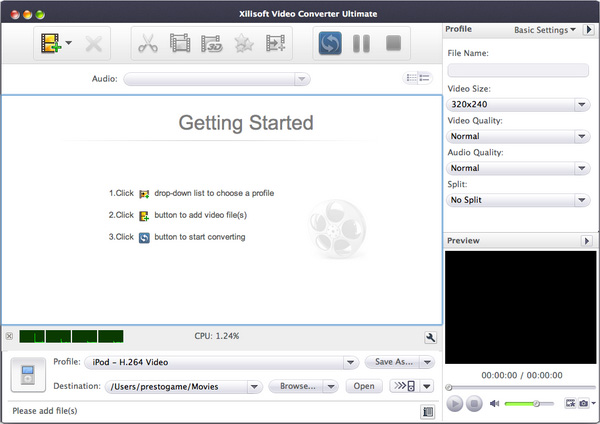
Step 2. Click Add button to import MP4 files.
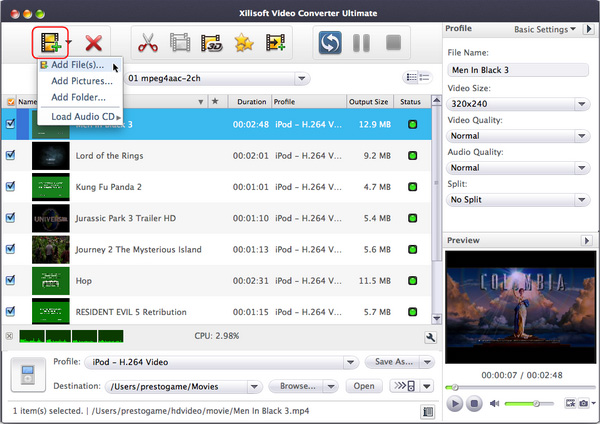
Step 3. Set profile for the selected output files on the right panel.
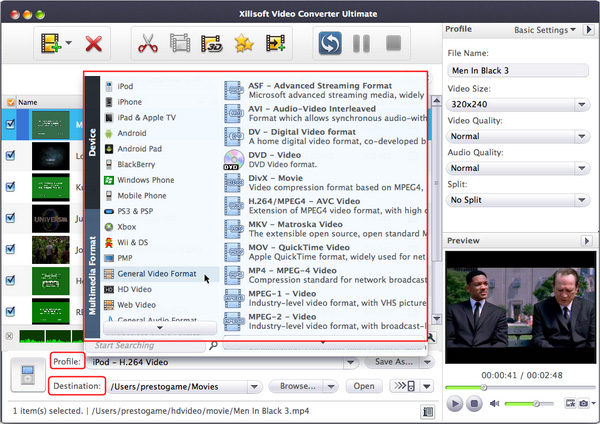
Click Profile drop-down list on the General panel to select an output format. You can also change video bit rate and audio bit rate for the selected profile.
Note: After setting the profile for the selected files, you can adjust parameters on Advance panel. For video formats, you can set codec, video bit rate, resolution, frame rate, etc. For audio formats, you can set audio codec, audio bit rate, sample rate and channels, etc. In most cases, the default works well.
Step 4. Click Browse button to set your output path.
Step 5. Click Convert button to start to convert MP4 to MPEG.
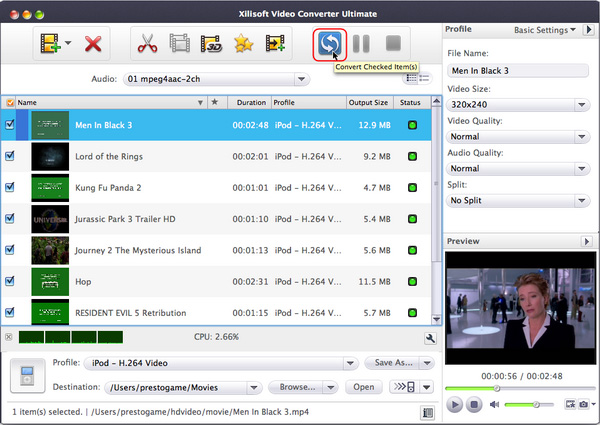
Step 6. After the conversion is done, you can click Open button to browse your output folder.
Some tips for using this MP4 to MPEG Converter for Mac OS:
1. You can convert a clip of your video file
Click Trim button to choose a segment of the selected file.
2. Supports batch conversion
This MP4 to MPEG Converter supports batch conversion and multithreading.
All you have to do is to add the files which you want to convert, and select profile for different files, then click Encode button.
3. Supporting H.264
7 profiles that support H.264 video codec have been added to this video converter for Mac's profile list. They are PS3 Video (1080P) MPEG-4 (*.mp4), PS3 Video (480P) MPEG-4 (*.mp4), PS3 Video (720P) MPEG-4 (*.mp4), PS3 Video (480P) MPEG-4 Excellent (*.mp4), PSP AVC Video Format (*.mp4), MPEG-4 AVC Video Format (*.mp4) and Zune MPEG-4 AVC Video Format(*.mp4). By using these profiles in encoding, the encoding data speed can be up to 30Mbit/s and the supported image pixel is ranged from 96x80 to 1920x1072, which provide you with more and better choices.
Note: At present, H.264 video codec has only processed macroblocks of 16. Therefore, the width and height of a video need to be the multiples of 16. For example, if you wish to output a video of 1080, please make sure that the video's height is 1072 or 1088 and the width is 1920.
Hint: If you wish to select a profile higher than 720P, please make sure that the source is DVD disc or folder in high definition (HD) format.
4. When connecting an iPod to a TV to play videos, it recommends "iPod Video2 For TV"
This MP4 to AVI converter for Mac provides six profiles, "iPod (320?240) MPEG-4 Normal", "iPod Video2 (640?480) MPEG-4 Normal", "iPod (320?240) MPEG-4 Excellent", "iPod Video2 (640?480) MPEG-4 Excellent", "iPod MPEG-4 Video- Minimal Size" and "iPod Video2 For TV" to support the conversion for iPod devices.
Hint: If you wish to connect an iPod to a TV to play videos and your iPod supports 640?480, it recommends iPod Video2 For TV.
Ok, we have finished converting MP4 to MPEG on Mac OS.


