
Xilisoft YouTube to MP3 Converter for Mac
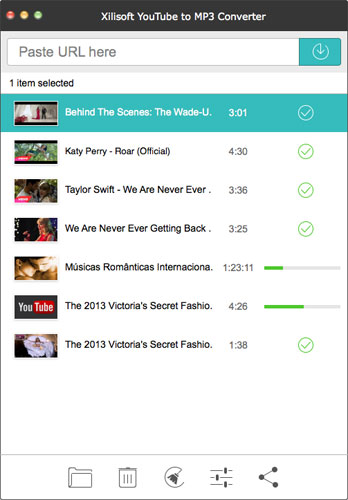
Would you like to save your favorite YouTube music video on Mac or music players? Xilisoft YouTube to MP3 Converter for Mac makes it possible to one-step download and convert YouTube videos to MP3 files. The new friendly design brings you much easier usage and better user experiences.
The software helps you easily and quickly download and convert YouTube music videos into MP3 files which are playable for most popular portable devices like iPod, iPhone, iPad and other music players. Xilisoft YouTube to MP3 Converter for Mac is the most convenient program to download YouTube video and enlarge your music collection! What's more, it's totally free.
- Download & convert YouTube FLV, MP4 videos to MP3 audios.
- Download YouTube HD videos to local Mac and convert to MP3 audios.
- Support simultaneous downloading tasks.
- Support directly transferring MP3 files to iTunes.

Customers Also Choose:
Xilisoft Video Converter Ultimate
Convert common and HD/3D videos in 160+ formats. Merge, clip, split, add video effects, watermark, subtitle, soundtrack, etc to better enjoy it.

Xilisoft DVD to Video Ultimate
Convert DVD to 160+ video/audio formats to play on various mobile phones and tablets. Clip/merge/split video, add subtitle, watermark, effects, etc.

Extract MP3 music from YouTube Videos 
Extract audios from YouTube MP4, FLV videos and convert them to Mp3 format.
- Download YouTube Videos to MP3
Download, extract and convert YouTube music videos to MP3 audios for playing on your digital music players. - Download and Convert YouTube HD Videos to MP3
Works as Xilisoft Download YouTube Video to download YouTube HD videos to save into local disk. Convert the downloaded videos to MP3 audios.

Convenient & efficient YouTube to MP3 Converter for Mac
Smart design makes operation easier and advanced setting makes downloading faster.
- Easy downloading & converting
This YouTube to MP3 converter is easy to be handled; users just need to paste the URL to this application to start downloading and converting . - More Options to Better Assist Your YouTube Video Downloading and Conversion
Set preferred video resolutions, preferred formats, audio bitrate; Set max simultaneous downloads and conversions; Set custom download and conversion settings. - Download and Convert Files in Batches
Download, extract and convert a batch of tasks simultaneously with good performance. Much of your time will be saved. - Multilingual Interface
English, German, Spanish, French, Japanese, Simplified and Traditional Chinese interface languages are optional.
| Input File Formats Supported | |
| YouTube MP4, FLV, Webm video | |
| Output File Formats Supported | |
| Audio | MP3 |
| OS | Mac OS X v10.6 - 10.14(Mojave) |
| Processor | Intel® processor |
| RAM | 256MB RAM (512MB or above recommended) |
| Free Hard Disk | 100MB free hard disk space for installation |
| Graphics Card | Super VGA (800×600) resolution, 16-bit graphics card or higher |


