How to convert RMVB to DVD with Xilisoft DVD Creator?
- Why will we convert RMVB to DVD? RMVB (Real Media Variable Bit-rate) is a video format designed for Real Media Player. Though some other players can support such format, it will not be played directly on DVD player. Users who would like to view video on their televisions might wish to convert RMVB to DVD. Following is a guide on how to complete such conversion. Free download this software: Convert RMVB to DVD .
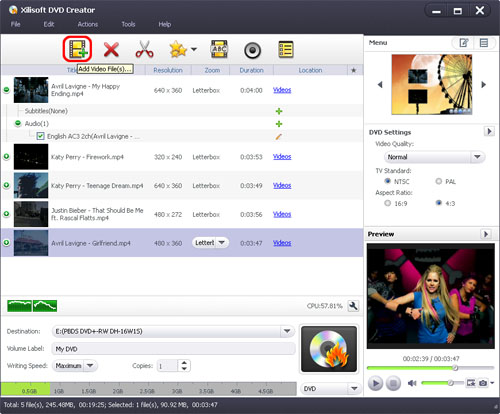
 Load RMVB files
- Run the DVD Creator and load the RMVB files you want to convert by clicking "Add Video Files" option under the "File" menu. Or you can click the "Add Video Files" button in the main interface.
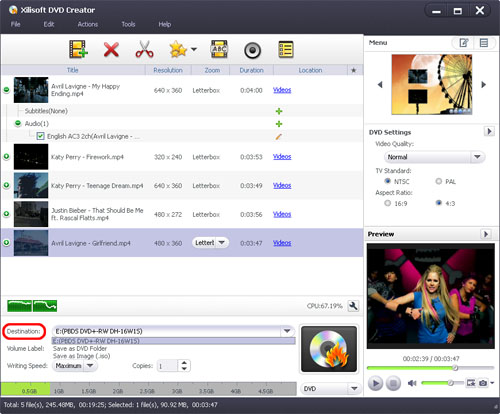
 Set destination
- Click the "Destination" drop-down button from the main window, and choose DVD disc, DVD folder, or ISO image file from the drop-down list as the output target.
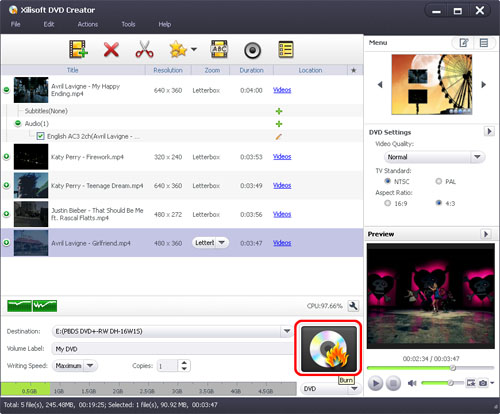
 Start the RMVB to DVD Conversion .
- You can start to burn the RMVB video to DVD by clicking "Start Burn" button.
- Would you like to burn several different format videos into DVD? Xilisoft DVD Creator can help you burn most popular video formats, such as AVI, DAT, DV, VOB, FLV, MP4, MKV, DVS(R)-MS, MPG, MPEG, TS, MOV, WMV, M2TS, MTS, MOD and H.264. More info you can visit: Convert RMVB to DVD.
More Info About DVD
DVD, also known as Digital Versatile Disc or Digital Video Disc, is an optical disc storage media format, and was founded in 1995.
In 2006, a new format called Blu-ray Disc (BD), designed by Sony, Philips, and Panasonic, was released as the successor to DVD. Another format, HD DVD, competed unsuccessfully with this format in the format war of 2006–08. A dual layer Blu-ray Disc can store 50 GB.