How to convert YouTube to MOV?
Dec 21, 2012 Posted by Helen Taylor to Tips
Xilisoft YouTube Video Converter can help you one step download FLV videos from YouTube, and then convert YouTube videos to MOV.
The tips below will tell you how to convert YouTube to MOV in the simplest way with high quality.
1. Free download the powerful and simple-to-use Xilisoft YouTube Video Converter, install and launch.
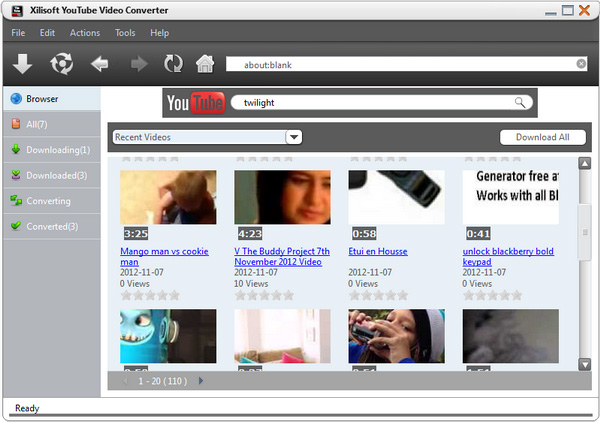
2. This smart FLV to video converter software provides three easy downloading ways to meet different needs. You can choose one of these ways like directly drag the video file to Drop Zone, drag URL to main window, or copy URL to "New Task" dialog box to download your beloved video from YouTube.com.
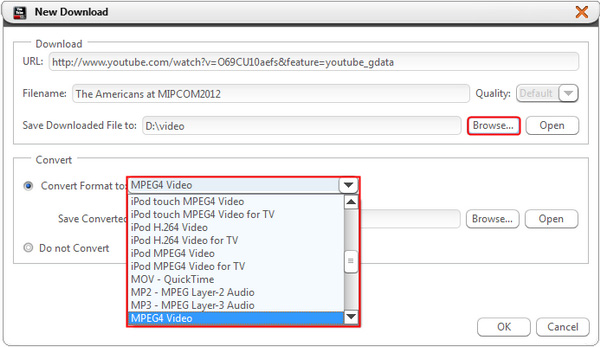
3. Choose the proper destination and the profile.
4. Click "OK" button! And the "downloading + converting" one-step solution offers you the simplest way to accomplish your YouTube to MOV downloading task.
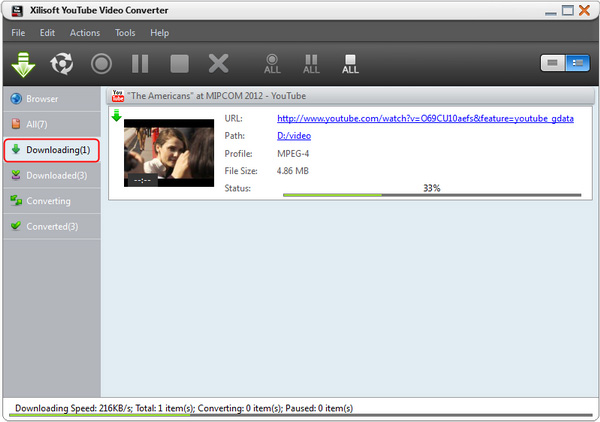
Tips 1: If you need, append many tasks at one time and the YouTube video converter will convert them one by one for saving your time.
Tips 2: Xilisoft YouTube Video Converter not only can support converting videos from YouTube.com, but also help you convert FLV files on your local computer.
Tips 3: The independent FLV player is built in this software to let you watch downloaded YouTube videos more conveniently.
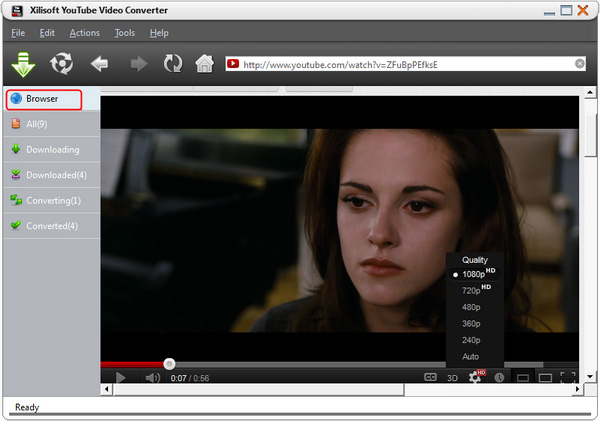
All these features can make the whole FLV to MOV video conversion much easier and faster, come and visit more information at: The Powerful YouTube to MOV Converter.
Add New Comment
Knowledge Base
- Convert VOB to WMV
- Convert YouTube to iPhone ringtone
- Convert FLV to 3GP
- Convert AVI to MP4
- Transfer files from PC to iPhone
- Transfer video from iPod to computer
- Convert SWF to MP4
- Convert MPEG to MP3
- Convert video to GIF image files
- Convert MP3 to M4R iPhone ringtone
- Convert WMV to FLV
- Burn AVI to DVD
- Record your Voice and make your Songs
- Convert RMVB to MP4
- Copy songs from iPod to Mac computer
- Convert AIFF to MP3
- Burn WMV to DVD
- Convert FLV to iPhone
- Manage iPhone without iTunes
- Convert MOV to AVI (DivX), MOV to MPEG
- Convert AVCHD to AVI
- Convert M4V to AVI
- Burn video files to DVD
- Convert FLV to MP4
- Convert HD movie to SD video
- Join video files on Mac
- Extract audio from DVD
- 5 Tips to Make Successful Video Conversion
- Convert M4V to DVD
- Use the M4R converter
- Make free ringtone for iPhone on Mac
- Cut videos/movies on Mac
- Convert YouTube to MOV
- Convert MKV to AVI, MKV to MPEG
- Put videos to iPod
- Convert MP4 to FLV
- Rip blu ray to MP4
- Convert FLV to MOV
- Convert WAV to MP3
- Convert RM to WMV
- Convert MOV to MP3
- Convert MOV to WMV
- Convert DVD to MP3
- Transfer iPhone music
- Convert XviD to AVI
- Convert MP4 to AVI on Mac
- Convert MKV to 3GP
- Convert HD video to Apple TV
- Convert WMV to AVI
- Convert RMVB to AVI
- Rip DVD movie to MP4
- Convert MP4 to SWF
- Save YouTube videos
- Convert MOV to AVI
- Convert YouTube to MP4
- Convert MPEG to MP4 on Mac
- convert FLV to PSP video files
- Split movies on Mac
- Rip Blu-ray disc
- Convert video to DPG
- Convert MP4 to MPEG on Mac
- Download and convert YouTube videos
- Convert FLV to DVD
- Convert RMVB to DVD
- Rip DVD to AVI


