
Convert RM to WMV: RM to WMV Converter
Have you ever been confused about how to convert RealMedia files (*.rm) to Windows Media files (*.wmv)? In this article, we will show you a step by step guide to complete the RM to WMV conversion using RM to WMV converter in three simple steps.
Xilisoft RM Converter is a powerful RM(RealMedia) file converter to convert RM, RMVB files to WMV, AVI, MPEG, DivX, AAC, MP3, WAV, etc. video and audio file formats such as converting RM to WMV, RM to AVI, RMVB to AVI.
Step-by-Step guide to convert RM to WMV?
First, please download Xilisoft RM Converter and install it.
Step 1. Add RM files.
Click "Add File" button on the toolbar or "File > Add File" to load your *.rm, *.rmvb files.
Step 2. Choose output format, output folder.
Choose the source file, click "Profile" drop-down button to choose "WMV - Windows Media Video (*.wmv)" as your output format, then click "Browse" button to choose destination folder for saving output files.
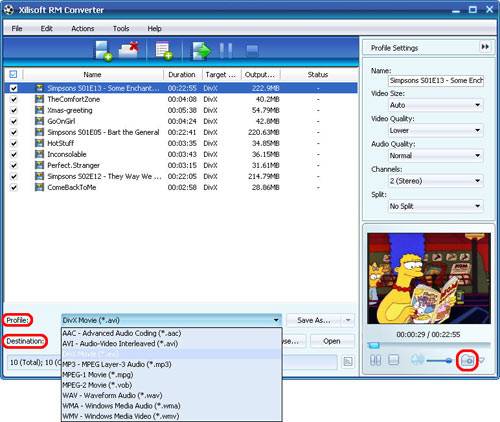
Step 3. Convert.
After choosing the format, you only need to click "Convert" button on the toolbar to complete the task.
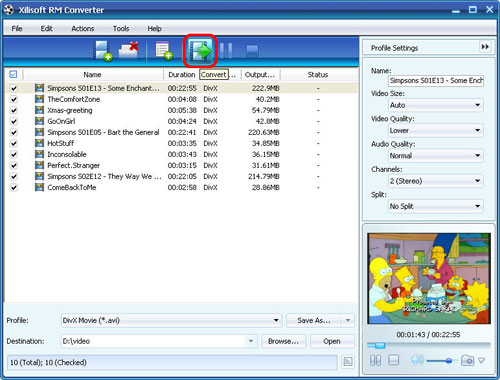
Ok, done.
If you're interested in this RM converter program, please visit: Xilisoft RM Converter.
Related knowledge about RM and WMV format
What is RM?
RM stands for RealMedia. Real Media is one of the most popular formats for streaming content on the Internet, RealMedia includes the RealAudio codec for sound clips and RealVideo codec for movies. RealAudio and RealVideo files are often given the common RealMedia ".RM" file extension. RealMedia files are often heavily compressed so they can stream over dial-up Internet connections.
What is WMV?
WMV stands for Windows Media Video. WMV, developed by Microsoft, is a generic name of Microsoft's video encoding solutions and doesn't necessarily define the technology what it uses. In WMV7, Microsoft has used its own flavour of MPEG4 video encoding technology. You can use a .wmv file either to download and play files or to stream content.


